

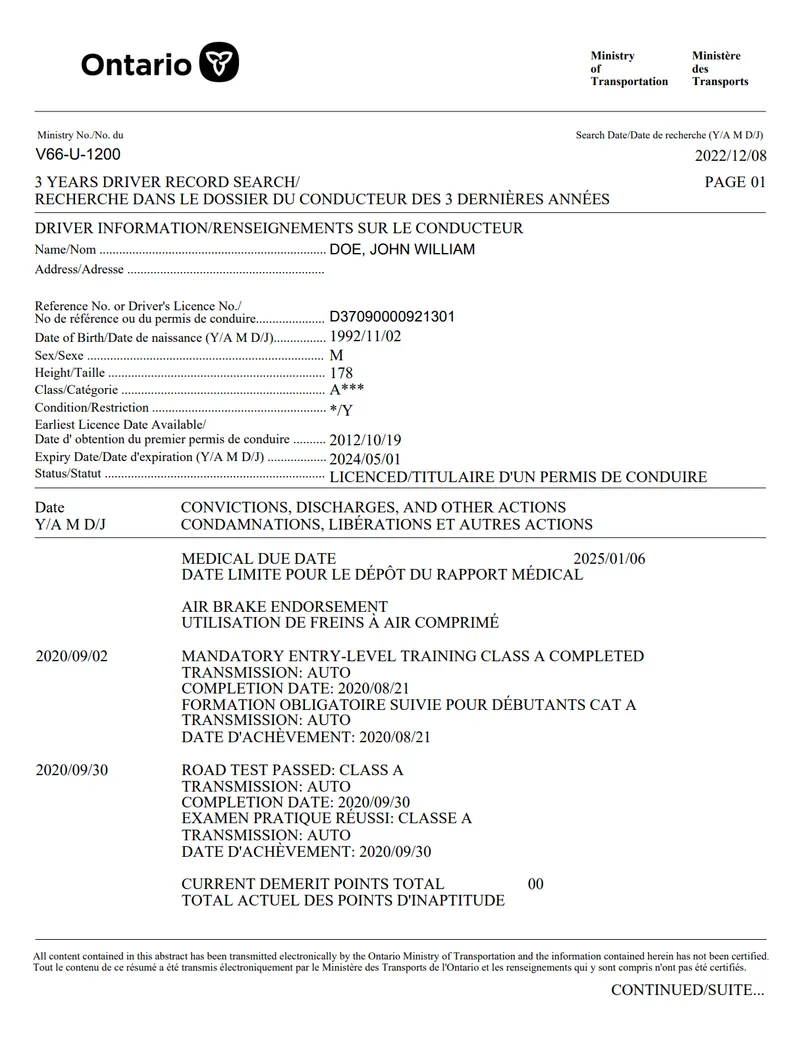
The header
Three fields here matter.
Ministry reference number
Identifies the form itself. Nothing to interpret; it is the same on every record of this type.
Search date
The most practically important field on the page. This is the date the record was produced. When an insurer or employer says they need a record issued within the last 30 days; this is the field they check.
It also means you cannot quietly reuse an old copy, the age of the document is printed on it.
Record title and page number
For the standard product this reads “3 Years Driver Record Search” with its French equivalent. If yours says something else; you may be holding a different record type, see Ontario driver record types compared.
Driver information
A labelled block identifying the licence holder. The fields worth reading carefully:
- Name: surname first, which occasionally reads as an error to people expecting given name first.
- Address: commonly blank. Normal, and not a sign of an incomplete document.
- Class: check this matches what you expect, particularly if a role requires a specific class.
- Condition/restriction: for example a corrective lenses requirement.
- Earliest licence date available: how far back the licensing record goes. Newcomers often find this is their Ontario licence date rather than when they first drove anywhere.
- Expiry date: worth checking. An expired licence is a more urgent problem than an old conviction.
- Status: for example “LICENCED”.
Reading the dates
Every date on the record uses year/month/day.
So 2024/05/01 is 1 May 2024. Read as day/month or month/day it becomes a different date entirely, and this is the single most common reason somebody concludes their record is wrong when it is not. Before querying an entry, check you read the date in the right order.
Convictions, discharges and other actions
The main body, listed by date, each described in English then French.
The heading is misleading, because this section carries more than convictions. Alongside genuine offences you will commonly find:
- Road tests passed, with the class and transmission type
- Mandatory entry-level training completed
- Air brake endorsements
- Medical due dates
None of those are offences. A clean record can list several, which is why counting entries tells you nothing, read what each one actually says. The full inventory is in what shows on an Ontario drivers abstract.
Where an entry is a conviction, only the offence name and date appear. There is no description of circumstances, no other party, and no indication of whether a collision was involved, covered in does a drivers abstract show accidents.
Current demerit points total
Stated plainly near the foot of the record, often as 00.
Do not read this figure in isolation. Demerit points expire on a shorter schedule than the convictions that produced them, so zero points and a listed conviction sit together perfectly comfortably. Anyone assessing you reads both ( how long convictions stay on your record).
The footer
Each page ends with a bilingual statement that the content was transmitted electronically by the Ministry of Transportation and has not been certified.
People occasionally panic at this, reading it as a disclaimer about reliability. It is not; it is the definition of “uncertified”, appears on every uncertified record, and is expected by anyone who asked for one. See certified versus uncertified records.
If your record runs to more than one page, each page is marked “continued” at the foot. A record with several convictions will be longer than a clean one.
If something looks wrong
Before assuming an error, rule out the two usual explanations: the date order, and the difference between points and convictions expiring. If you are working from memory rather than the document, order your 3-year abstract first and read the real thing.
If it still looks incorrect after that, take it up with the Ministry of Transportation with the record in hand, having the actual document makes the process far more straightforward than describing it from memory. See how to check your driving record.
Frequently asked questions
How do I read the dates on my drivers abstract?
Dates are in year/month/day order. A date reading 2024/05/01 is 1 May 2024, not 5 January. This trips people up constantly, so check the order before concluding something is wrong.
What does the search date on my record mean?
It is the date the record was produced. Insurers and employers who require a record issued within the last 30 days check this field, so it effectively determines whether your copy is still accepted.
What does "CURRENT DEMERIT POINTS TOTAL 00" mean?
You currently have no demerit points. It does not mean you have no convictions, points expire on a shorter schedule than the convictions that caused them, so read the convictions section as well.
What does the footer about electronic transmission mean?
It states that the content was transmitted electronically and has not been certified. That is simply what "uncertified" means and appears on every uncertified record. It is not a warning about accuracy.
Why does my record show entries that are not offences?
The convictions section also carries administrative items such as road tests passed, training completed, air brake endorsements and medical review dates. Read the description of each entry rather than assuming every line is an offence.